For Nonprofits Blog
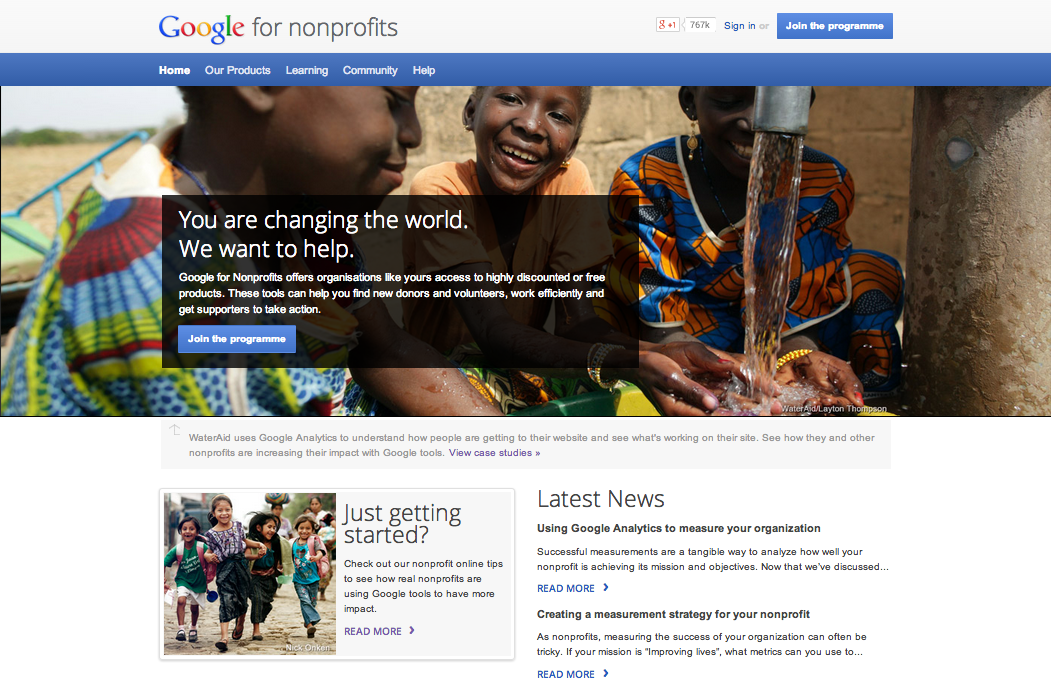
You're changing the world. We want to help.
You're changing the world. We want to help.
Monday, June 9, 2014
Today, we are excited to work with TechSoup Global and TechSoup Canada to bring Google for Nonprofits to Canada.
Canadian Registered Charities, Canadian Federal Nonprofits, and Canadian Provincial Nonprofits
can
apply to join the program,
which offers access to our suite of free products and tools.
Once your organisation is approved, you can get access to free
Google Apps
to cut IT costs and operate more efficiently, up to $10,000 a month in advertising on
Google AdWords
to reach more donors, and premium features for
YouTube
and
our mapping technologies
to raise awareness of your cause. We’ve also developed other online resources such as
educational videos
,
case studies
and other ways
to connect
with other nonprofits.
We see the impact every day of nonprofits embracing the web - it’s literally transforming the way they work.
Samasource
has connected women, youth and refugees to meaningful work opportunities over the internet.
Kiva
funds millions of dollars in loans through online donations to entrepreneurs in need. We’re also seeing this in Canada. And
Ladies Learning Code
is one of many organizations in Canada using web-based tools to run a network of 6,000 volunteers to host code-learning workshops all over the country.
We’re inspired and humbled by the amazing ways nonprofits are making the world a better place, and look forward to supporting the work of more nonprofits in Canada.
Posted by Naveen Viswanatha, Product Manager, Google for Nonprofits
Google Ad Grants: Four Tips for Disaster Relief Organizations
Thursday, June 5, 2014
When a disaster strikes, nonprofits organizations like you are crucial in providing relief to people around the world.
We want to help you optimize your Google Ad Grants account
before
a crisis occurs, so you can get out information as quickly and widely as possible. We’ve provided four tips to
prepare for future events and to make the most impact for those in need.
1. Create a disaster relief campaign
Create a separate campaign
for disaster relief, with
ad groups
for each type of disaster, such as hurricanes, earthquakes and floods. By organizing your account this way, you’ll have ads and keywords that are directly related to each other, allowing users searching on “hurricane relief” to be shown an ad directly about hurricanes. When a crisis strikes, you’ll now have template ad groups ready, so you can quickly edit ad text and add keywords to highlight that particular disaster. Having a separate campaign dedicated to disaster relief also allows you to allocate more budget to that campaign during times of crisis.
2. Find relevant keywords with Google Trends
You can use
Google Trends
to find top and rising keywords that people search on, such as “tornado relief” and “help tornado victims”. It can help you gather new keywords variations that you might be missing in your campaign to capture the most traffic. When a disaster strikes, you can quickly add more specific keywords to your list that include the disaster name or location, such as “Hurricane Andrew” or “Oklahoma tornado victims”.
3. Use tools from Google Crisis Response
Google wants to help first responders like you and has created
Google Crisis Response
to help make your job easier and more efficient. For example, you can embed
Google Person Finder
in your website or contribute and share data with the
Google Crisis Map
. Learn more about the
tools and resources
for first responders at Google Crisis Response.
4. Connect with
Google Helpouts
Google Helpouts
is a convenient way to
get live help over video.
No matter who you are, where you are or what time it is, you can talk to someone who can help you. You can browse
categories or search on specific topics
, such as help with your AdWords account or your other organizational needs.
If you’d like to learn more about using Google Ad Grants for your nonprofit, check out our
AdWords help resources
. Or, if you’re new to Google Ad Grants, visit
our site
to apply. Nonprofits receive up to $10,000 per month in AdWords advertising to promote their missions and initiatives via text ads on Google search result pages.
Posted by Nikki Lopez, Google Ad Grants team
Boost your channel's recognition using new intro videos
Wednesday, April 30, 2014
Everyone knows the power of a good introduction. Imagine watching
The Simpsons
without its iconic opening sequence. Wouldn’t be the same, would it?
Many of you have asked us for a way to create a distinctive intro for your videos, so you can more easily build a consistent brand your fans will recognize. Well, game on. Starting today you can automatically add an intro video up to three seconds to the start of every video on your channel.
It only takes three easy steps to set up:
Upload the three-second intro video you’d like to use to your channel as an unlisted video.
On your channel's
InVideo Programming page
, click "Add a channel branding intro" and select the intro from a list of eligible videos.
Select which videos you want the intro to appear on. You can choose whether to add it to all of your videos, or just the ones you’ve uploaded after a certain date. You can always remove or change the intro later.
Note that these intros may not be used as ads, sponsorships, or product placements. We also don't recommend this feature be used by channels using their videos as advertisements.
As always, we want to hear how things work out for you. Send us feedback from your
YouTube dashboard
, or via
Google+
or
Twitter
.
Posted by John Gregg, YouTube Software Engineer
From Lake Tanganyika to Google Earth: Using tech to help our communities
Thursday, April 3, 2014
Today we're joined by Dr. Jane Goodall, primatologist and founder of the Jane Goodall Institute and Roots & Shoots program. In this post, Dr. Goodall shares her thoughts on how today’s technology can enable more people around the world to make a difference in their communities. Join Dr. Goodall for a celebratory
Birthday Hangout on Air
today at 11 a.m. PDT/2 p.m. EDT.
-Ed.
When I first set foot on the shores of
Lake Tanganyika
in 1960 to study chimpanzee behavior, I carried with me notebooks, pencils and a pair of second-hand binoculars. I was, at the time, a young woman with no scientific training, but had a strong passion for learning about animals in Africa. In later years I founded the
Jane Goodall Institute
, dedicated to preserving the habitat of chimpanzees and other animals worldwide.
The author connects with a member of the Kasakela chimpanzee community in Gombe.
Photo courtesy of JGI.
Today, the mapping technology available to all of us is completely changing the potential for animal and environmental research. My trip in 1960 would have looked quite different today. You have much more power at your fingertips, and you don't even have to leave your home. Tools like
Google Earth
let you visit the shores of Lake Tanganyika with just a few keystrokes. And in
Gombe
, local villagers are using Android smartphones and tablets, in conjunction with Google Maps Engine and Earth Engine, to
monitor changes in the forest habitat
that affect chimpanzee populations. Technology makes it so easy for people to find and share information and to understand the world around them. And once we understand, we can start to foster positive change.
The Jane Goodall Institute engages local communities from Tanzania, Uganda and across Africa to collect data on forests, wildlife and human activities using Google Android handheld devices.
Photo courtesy of JGI/Lilian Pintea.
That’s one of the reasons we started the
Roots & Shoots
program to connect young people with the knowledge and tools they need to solve problems in their communities. The projects undertaken by these young people help them learn important science, technology, engineering and math (STEM) skills while developing real leadership capabilities. Today, Roots & Shoots is launching a new
community mapping tutorial
for young people to help them use digital mapping technology to identify and address needs in their community. If you’re an educator, we offer online professional development to help you fit our youth leadership model into your classroom and curriculum. You can sign up for the
Roots & Shoots MOOC
to learn more.
Roots & Shoots groups from Uganda, Tanzania, and Republic of Congo share their projects.
There are more than 8,000 Roots & Shoots groups in 136 countries. Photos courtesy of JGI.
Today, on my 80th birthday, my wish is for young people around the world to think about the ways you can use technology to learn more about the wonderful world we share. Then, to take action, and inspire others to do the same. You have the power to do so much more than I did in 1960, to spark change I could only imagine back then. And you can do it no matter where in the world you are.
Posted by Dr. Jane Goodall
Introducing Google Maps Gallery: Unlocking the World’s Maps
Thursday, February 27, 2014
Editor’s note:
Last year we
introduced
the
Google Maps Engine
public data program, which lets organizations easily publish their map content online. Today, we’re expanding on that program and letting organizations improve the discoverability of their maps. To find out more information about the program, read our
FAQ
.
Governments, nonprofits and businesses have some of the most valuable mapping data in the world, but it’s often locked away and not accessible to the public. With the goal of making this information more readily available to the world, today we’re launching
Google Maps Gallery
, a new way for organizations to share and publish their maps online via
Google Maps Engine
.
Maps Gallery works like an interactive, digital atlas where anyone can
search for and find rich, compelling maps. Maps included in the Gallery can be viewed in Google Earth and are discoverable through major search engines, making it
seamless for citizens and stakeholders to access diverse mapping data, such as locations of
municipal construction projects
,
historic city plans
,
population statistics
,
deforestation changes
and
up-to-date emergency evacuation routes
. Organizations using Maps Gallery can communicate critical information, build awareness and inform the public at-large.
Google Maps Gallery also offers several key benefits for organizations. With the Gallery, governments, nonprofits and businesses can publish maps and manage their content on their own terms with settings that enable control over maps branding, styling and licensing. Additionally, with the ability to synchronize maps from legacy systems and open data portals to the Gallery, organizations can take advantage of having a complementary online channel for their data. This lets their maps be more accessible and useful for their audiences — all powered by Google’s reliable cloud infrastructure.
Today, Gallery users can browse content from organizations
such as
National Geographic Society
,
World Bank Group
,
United States Geological Survey
,
Florida Emergency Management
and the
City of Edmonton
— but this is just the beginning. Maps Gallery is now open to organizations with content for the public good. Organizations interested in submitting content can
apply
to participate in Maps Gallery.
Google Maps Gallery gives organizations better ways to surface maps and make data more discoverable. Together with governments, businesses and nonprofits, we can unlock the world’s geospatial data.
Posted by Jordan Breckenridge, Google Maps, Product Manager
Supporting computer science education with the 2014 RISE Awards
Monday, February 3, 2014
"We need more kids falling in love with science and math.” That's what Larry Page said at last year's I/O, and it's a feeling shared by all of us. We want to inspire young people around the world not just to use technology, but to create it. Unfortunately, many kids don’t have access to either the education or encouragement they need to pursue computer science. So five years ago we created the
Google RISE (Roots in Science and Engineering) Awards
, which provide funding to organizations around the world that engage girls and underrepresented students in extracurricular computer science programs.
This year, the RISE Awards are providing $1.5 million to 42 organizations in 19 countries that provide students with the resources they need to succeed in the field. For example,
Generating Genius
in the U.K. provides after-school computer science programs and mentoring to prepare high-achieving students from disadvantaged communities for admission into top universities. Another awardee, North Carolina-based
STARS Computer Corps
, helps schools in low-income communities gain access to computing resources for their students to use. Visit
our site
for a full list of our RISE Award recipients.
Created in 2007, the Children’s University Foundation has been carrying out educational programs for more than 20,000 children aged 6-13. Click on the photo to learn more about this and other RISE Awardees.
This year we’re also expanding the program with the RISE Partnership Awards. These awards aim to encourage collaboration across organizations in pursuit of a shared goal of increasing global participation in computer science. For example, more than 5,000 girls in sub-Saharan Africa will learn computer science as a result of a partnership between the Harlem based program
ELITE
and the
WAAW Foundation
in Nigeria.
We’re proud to help these organizations inspire the next generation of computer scientists.
Posted by Hai Hong, RISE Program Manager
Reach your giving season goals with Google tools
Friday, December 20, 2013
We’re always inspired by organizations who use technology in innovative ways to extend and communicate their impact. Recently, we sat down with one such nonprofit,
N/a’an ku sê
, an organization that conserves and preserves the people and animals of Namibia through projects like an animal sanctuary, free health clinic, children’s school and the newly added nature reserve. Their digital marketing and communications manager, Leah Llach shared several tips and real-life examples on how to get the most out of seasonal online communications and how Google tools can help. We’ve shared a few of her insights below, but make sure to watch the
Hangout
to get the full story.
Set goals.
Work with your team to create written priorities for the holiday season. If you're working on several different projects, this helps everyone align on the mission and direction
.
Speak the same language.
Internally, it can be as simple as naming conventions in spreadsheets and databases. For example, using the term ‘Animal Adoption’ instead of ‘Animal Adoptions’ can affect how your filters work and result in inaccurate data. Externally, keep your holiday messaging across your website, ads, emails and videos consistent.
Use video to connect with users.
When you’re halfway around the world, people need a way to connect with you emotionally and videos do that better than just text or photos. N/a’an ku sê focuses on sharing videos showing the impact of their work in Namibia to influence users while fundraising. Last year’s efforts alone resulted in a 128% increase in donations within December and January.
1
To learn more about these ideas and using Analytics, YouTube and Google Ad Grants to maximize your online communications, check out the full Hangout with Leah. And if you're interested in other ways to leverage online tools during giving season, continue to visit our
Google+ page
,
Twitter
and
blog
for more best practices tagged #givingseason.
Posted by
Colby Chilcote
, Google for Nonprofits team
[1] N/a’an ku sê Internal Revenue Data
Optimizing your Google Ad Grants account to reach donors
Thursday, November 21, 2013
According to a
Google and Millward Brown Digital study
, 76 percent of donors said they go online to research a nonprofit organization after recalling seeing an ad online.
Google Ad Grants
, the nonprofit edition of AdWords, allows you to reach those people with ads on Google.com. To help you create effective ads and keywords for the holiday giving season, we recently hung out with Google Ad Grants experts who shared the tips below.
Create strong ads.
Highlight tangible impact and include a clear call-to-action in ad copy
. Show users the effect their donation can have on your cause in your ad. If you’re a cat shelter, consider using language like “$30 = 1 vaccination for a cat in our shelter.” Then, tell users the next step with a call-to-action like “Donate now!” or “Volunteer today!”.
Use multiple ad variations in each ad group
. Experiment with different ad copy and messaging. AdWords will automatically optimize your ads for you by showing the ad that performs best more often.
Create ad copy that is relevant to your keywords
. If your ad group’s keywords are focused on holiday donations, create ads that clearly mention holiday donations. This will make your ads clearly relevant to users who see them when searching for terms related to your keywords.
Optimize your keywords.
Make your keywords relevant to your mission
. Use keywords that are 2-3 words long to reach people that are interested in your cause. Keywords like “nonprofit” or “donate” are too general. Instead, if you’re an art center, use keywords like “community art center donations” or “art education nonprofit.”
Consider using negative keywords
. If you have keywords that are relevant to both your organization and other industries or topics, you can use negative keywords to block traffic that you don't want. For example, if you offer youth tutoring, you may want to add negative keywords like “college” and “adult”, so that people looking for help with college courses or adult education don’t see your ad. To learn more about adding negative keywords, check out
this article.
See what users are searching for when they click your ad with the AdWords Search Terms Report
. You can see exactly what users who clicked on your ad searched for in Google through this report. This is great way to get ideas for new keywords to add to your account. Instructions on viewing this report are available
here
.
If you’d like to learn more about using Google Ad Grants to spread the word about your nonprofit this giving season, watch the full Hangout
here
or check out
our AdWords help resources
. And if you’d like to learn more about using online tools to get the most out of giving season, continue to visit our
Google+ page
,
Twitter
and
blog
for more best practices tagged #givingseason.
Posted by Katie Kellogg, Google for Nonprofits team
Engage and influence donors with video
Wednesday, October 23, 2013
As we continue to move into the heart of giving season, how are you reaching donors online? Video is a powerful tool that engages potential donors on the path to donation. In
a recent survey
, we found that 80% of donors used online video to learn more about a nonprofit organization. And, 57% of donors made a donation after watching an online video. To make sure you’re getting the most of your video and YouTube experience, check out these resources to help you build and optimize your channel.
Join the YouTube for Nonprofits program and create your own free YouTube brand channel.
The first step in engaging donors on YouTube is building out your own brand channel to house your videos and connect with your online community. Visit the
YouTube for Nonprofits site
to join.
Get started planning your YouTube campaign and sharing it with your community.
Once you’ve created your channel, you’re ready to begin reaching your audience and gaining exposure by creating and sharing a YouTube campaign. Take a look at
these three quick video lessons
to help you get your first campaign off the ground.
Optimize your videos and channel with best practices like adding Call-to-Action overlays and creating video playlists.
Beyond having donors watch your videos, you can encourage them to action by adding Call-to-Action overlays that drive traffic to your website, petition or other relevant site. Or, if you’d like to engage users around a specific topic, curate several videos into a playlist around that content to fully inform your audience. To dive into more of these and other best practices, check out the entire
Playbook for Good.
If you’d like to learn more about using video and other online tools to get the most of out giving season, continue to visit our
Google+ page
,
Twitter
and
blog
for more best practices tagged #givingseason.
Posted by Katie Kellogg, Google for Nonprofits team
Google Maps and giving season
Monday, October 14, 2013
As giving season arrives, we know that many of you are thinking about how to communicate with your donors. Perhaps you’d like to let potential donors know where they can drop off their donations or you’d like to demonstrate where their monetary gifts go. To do this, we’ve seen more and more organizations opting to use visually compelling maps. Check out these stories on how other organizations are using Google Maps to effectively communicate with their donors and make the most of giving season!
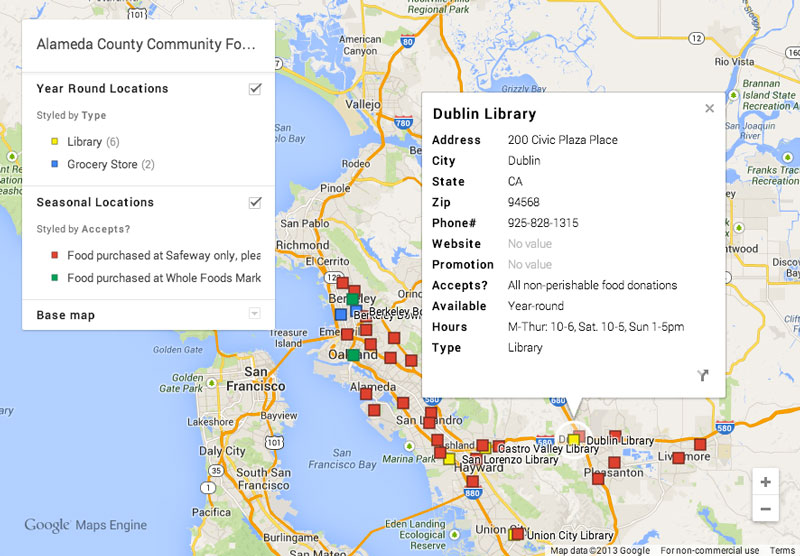
Alameda County Community Food Bank
has been using Google Maps to help potential donors find out where they can donate non-perishable food items to help alleviate hunger in their community. Through this interactive map, donors can see which drop-off location is located closest to them, find out the hours they’re open, what types of donations are accepted and more.
Alameda County Community Food Bank’s donation drop-off locations
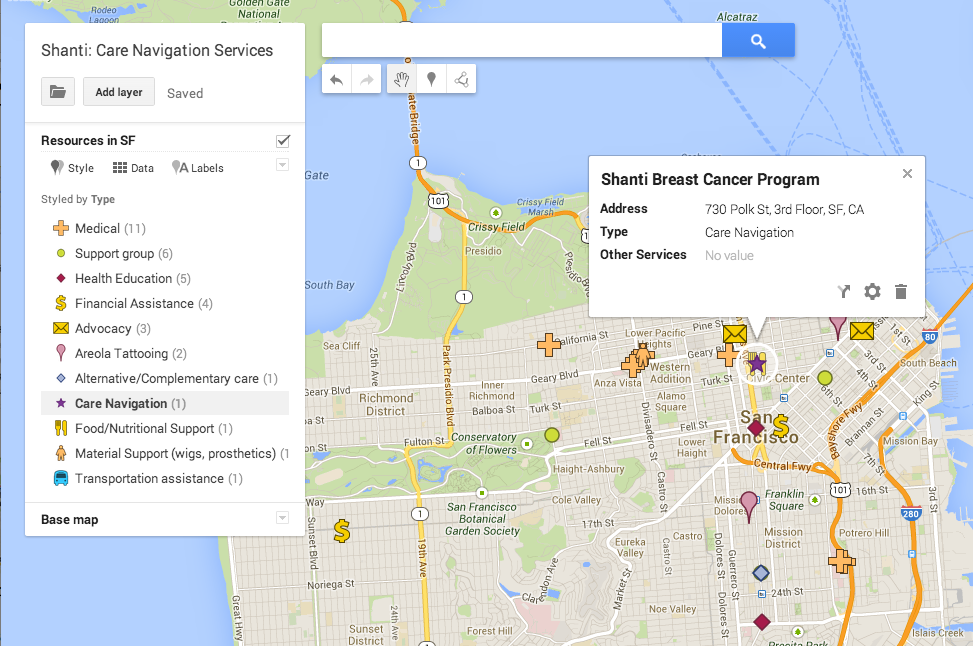
The Shanti Project
assists breast cancer patients in coordinating all stages of their care between low-cost medical services, health education classes, emergency funds and nutritional support so they don't have to figure it all out alone. Shanti is using maps to help its donors visualize the need for the navigation services it offers to their patients.
Shanti’s map of care coordination services
If these examples have given you inspiration for creating your own maps for donors, then we’ve got the perfect tool for you. Earlier this year, Google made it easier to create maps with the launch of
Google Maps Engine Lite
. With Google Maps Engine Lite, you do not need to be a trained cartographer or computer programmer to make your own beautiful, interactive map for your website. In a few simple steps, you can have a map displayed on your website that shows your donation centers, soup kitchens or volunteer locations.
You can start by heading to
Google Maps Engine Lite
and logging in with your Google account. To add locations to your map, you can either search for and add them one-by-one, or you can upload a spreadsheet of your locations with relevant information. Google Maps Engine Lite will help you map those locations quickly. Next, you can choose from different icons and base map styles to make your map more readable and appealing to your donors. You can add and edit information about each location directly in the map as well, so it’s very easy to add more locations down the line, or remove locations you no longer use. Once you’re happy with your map, simply click the “Share” button to get a link or the folder icon to get the HTML embed code to put it on your website. You can find the detailed instructions to walk you through all these steps in our
tutorial
.
To learn more about Alameda County Community Food Bank, Shanti and how to create maps with Google Maps Engine Lite, check out our
Hangout on Air
. Happy mapping!
Posted by Allison Lieber and Raleigh Seamster, Google Earth Outreach team
Labels
AdWords Basics
98
AdWords in the Curriculum
9
Google Analytics
9
Google Apps
25
Google Apps Highlights
10
Google Earth
18
Google Earth Outreach
28
Google for Nonprofits Blog
529
Google Fusion Tables
2
Google Maps
10
Google Products
63
Google Sketchup
2
Google+
16
Grantees
98
Grants Program
97
Optimization
59
Program Alerts
15
Resources for Non-Profits
179
Tracking Performance
35
YouTube
26
Archive
2016
Sep
Aug
Jul
Jun
Apr
Mar
Jan
2015
Nov
Sep
Aug
Jul
Jun
May
Apr
Feb
2014
Nov
Oct
Aug
Jul
Jun
Apr
Feb
2013
Dec
Nov
Oct
Sep
Aug
Jul
Jun
May
Apr
Mar
Feb
Jan
2012
Dec
Nov
Oct
Sep
Aug
Jul
Jun
May
Apr
Mar
Feb
Jan
2011
Dec
Nov
Oct
Sep
Aug
Jul
Jun
May
Apr
Mar
Feb
Jan
2010
Dec
Nov
Oct
Sep
Aug
Jul
Jun
May
Apr
Mar
Feb
Jan
2009
Dec
Nov
Oct
Sep
Aug
Jul
Jun
May
Apr
Mar
Feb
Jan
2008
Dec
Nov
Oct
Sep
Aug
Jul
Jun
May
Apr
Mar
Feb
Feed
Google
on
Follow @googlenonprofit
Follow



.jpg)


 Follow