For Nonprofits Blog
You're changing the world. We want to help.
Google Tag Manager: Video and Q&A
Wednesday, November 28, 2012
(Cross posted from the
Google Analytics blog
)
Have you ever struggled with implementing new marketing and measurement tools on your website? For many people, deploying data collection “tags” (like conversion tracking, remarketing, audience reporting and analytics) can take weeks or months. Worse, the tag implementation is often incorrect, meaning you’re missing out on valuable information about your site and its users.
It doesn’t need to be difficult. We recently held a webinar to introduce users to
Google Tag Manager
, a free tool that helps marketers and IT departments manage their marketing and measurement tags quickly and easily. Watch the video here to learn more about:
Overall benefits and features of using Google Tag Manager
A quick demonstration of how to deploy a new tracking tag
Tips for getting your company started with Google Tag Manager
In addition to this webinar, we’ll be hosting a technical webinar in January to help new users through the nuts and bolts of installing Google Tag Manager (with lots of concrete examples). Stay tuned -- we’ll share registration information in a future blog post, or you can check back on the
Learn with Google webinar site
.
Read on for responses to some of the top questions we received during the webinar.
Questions and Answers
Where can I find out more about the core concepts described in the webinar?
To learn more about the Google Tag Manager management interface, please visit our
Help Center
-- you may want to start with our
Before you Begin
article. There you can find more information about key concepts like
Tags
,
Rules
, and
Macros
. For developers interested in how to implement Google Tag Manager, please visit our
developer documentation
. Or if you’d like help with implementation, you can contact one of our
Partners
. You can also ask questions (and find responses to questions from others) on the Google Tag Manager
product forum
.
What happens to historical data if we move to Google Tag Manager?
All of your historical data should be preserved when you move to Google Tag Manager. Google Tag Manager only changes the way that tags are deployed and managed on your site, it does not change the way data is collected.
How would you migrate a tag?
Follow these steps to migrate tags -- whether it’s a single tag or all the tags on your site. If you’re just getting started, take a look at our
Before you Begin
article.
Create a Google Tag Manager Account and a Container
associated with that account.
Install that Container code snippet on every page of your website (so that it appears immediately after the opening <body> tag). The container should be empty.
Map your site - thinking about what data you want to collect, what events you want to track, and which tags you want to use to track that data. You should think about where your current tags are implemented, but now is a great time to rethink your overall data collection goals and start fresh.
(Optional) If you would like to make use of the
Data Layer
functionality, create a data layer on the pages where you wish to pass information or fire tags
Create Tags, Rules and Macros within the Google Tag Manager interface according to the map you just created. Make sure to apply the correct Rules to your Tags to make sure they fire in the right place.
Test the changes you’ve made in Google Tag Manager using
debug and preview mode
.
Then push a version of your site live that has removed the hard-coded tags from within the page. At this time, also
Publish
your changes using the Publishing feature of Google Tag Manager, which pushes the changes live to the site.
For more precise details on these steps, read our
developer documents about migration
.
Can you add tags to events or buttons?
Definitely! In order to use Google Tag Manager to fire tags on events and buttons, follow these steps (for more detail, read our
developer document on event handlers
):
On your page, proactively add the dataLayer.push({ ‘event’: ‘myEventName’}) to the event handlers for all events and buttons you might want to track.
Create a new rule where “event equals myEventName”.
Associate this rule with any tag you’d like to fire when the specified event happens.
Can hard-coded tags and tag manager co-exist? Do I have to remove my other tracking tags?
We strongly recommend that you completely migrate all your tags, so you can take advantage of the benefits of managing and updating those tags within Google Tag Manager. However, if a full migration seems too hard, you can use Google Tag Manager in parallel with hard-coded tags. Some of our users use Google Tag Manager to only manage adding new tags.
If you choose to do a partial migration to Google Tag Manager, you need to be very careful to make sure you don’t accidentally start double-counting your tags. If you decided to deploy a tag via Google Tag Manager, make sure that you don’t have a version of the same tag firing on the same page.
Can you build your own custom tag templates? And how do I become a recognized Tag Vendor within Google Tag Manager?
Custom Tag templates within Google Tag Manager allow you to copy/paste any HTML or Image tags directly into Google Tag Manager and fire it based on your predefined rules and macros. To turn it into a template, use the
{{macro_name}} syntax
to populate the tag code with dynamic values. We will also do a syntax check to ensure that when you copy your 3rd party tag, it will fire as intended.
If you’re interested in having your tag added to the list of predefined templates, apply to become a Tag Vendor within Google Tag Manager by completing
this interest form
.
How does this work with Google Analytics? How do you do things like track pageview and track event within Google Analytics?
Google Tag Manager is a convenient way to correctly deploy Google Analytics across your site. To use Google Analytics within Google Tag Manager, simply create a Tag with the
Google Analytics tag template
. You can select the “Track Type” as either a pageview, an event, or a transaction.
Make sure you have some version of the Google Analytics tag firing across all pages on your site. A good way to do this would be to have a basic tag firing on all pages, but blocking on pages where your more customized tags are firing (like the thank you page where you’d be firing a specialized transaction tag type).
Can the Google Tag Manager snippet be placed in <head>? How about in my footer?
The recommended best practice is to have the Google Tag Manager snippet at the top of the <body> to maximize data collection, but some clients may find it easier to implement the Container snippet elsewhere in the in the page, like the footer.
Do not place the Google Tag Manager snippet in <head> (for the IT folks: this is because there is an iframe in the <noscript> case, which can have unpredictable results in some browsers).
No matter where you install the container snippet, you will need to make sure that this snippet of code is on every page of their site. Google Tag Manager will still work if you only deploy it on part of your site, but Google Tag Manager’s rule based system will only work on pages where the snippet is deployed. For more details, read our
developer documents
.
Does Google Tag Manager replace Doubleclick Floodlight?
No, Google Tag Manager does not replace Floodlight -- they are complementary. Floodlight is a conversion pixel for DoubleClick products (
Floodlight tags
can now be deployed within Google Tag Manager), and Google Tag Manager is a tag management system or “container tag” for multiple tagging technologies. Floodlight has previously been used by some users as a container tag as well, but moving forward, Google Tag Manager is a way to deploy all tracking technology.
You also have the ability to pass custom floodlight variables through Google Tag Manager into Floodlight, through the Data Layer. For more information, please review the material in the
Developers Guide
.
We hope this webinar and this blog post will help you as you get started with
Google Tag Manager
, and we look forward to seeing you at our technical webinar in January. (Registration details coming soon).
Posted by Laura Holmes, Product Manager, Google Tag Manager
#givethanks for Nonprofits
Wednesday, November 21, 2012
Tomorrow in the U.S., millions of friends and families will celebrate Thanksgiving - sharing time together, eating holiday favorites and, of course, giving thanks. This week, the Google for Nonprofits community started the celebration early by
giving thanks
to their favorite nonprofits and sharing some amazing stories along the way. Check out a few inspiring examples below:
This year, I
#givethanks
for Lurie's Children's Hospital. They provide world class service to children in the Chicagoland area, including some Googler children. Not only do they provide volunteer opportunities for our Chicago Googlers, but they think of us for unique opportunities like working at their local Dance Marathons!
I
#givethanks
for Start With a Story. Volunteers sit in the lobby of the prison in either Dublin or Oakland and give out free, brand new books to kids in the lobby who are waiting to see their family members. They also read with them. The same kids show up every week, excited to browse the selection and pick out a new book.
I
#givethanks
for
+
MLANGO e.V.
.
Mlango makes sure that 2500 children in primary schools in Malawi can go to school each day and learn because they get a nutritious meal there. I love what they do and support them because I think that no child should have to work or find food instead of going to school. 100% of donations go directly to the school feeding projects, Mlango has no admin fees, all members work as volunteers. I also appreciate how they include the local communities in their projects, e.g. by having the kids' mothers cook the daily meals and the fathers take care of the school garden. Mlango funds the projects, but the local community has to work together to run them successfully.
If you’d still like to
#givethanks
to your favorite nonprofit, you can. Just make sure to +mention the nonprofit’s Google+ Page, share why you’re thankful for them and use #givethanks in a Google+ post.
And from all of us at Google for Nonprofits, we #givethanks for being a part of this vibrant community of folks that support nonprofits. Happy Thanksgiving!
Posted by Katie Kellogg, Google for Nonprofits team
Hangout with Environmental Nonprofits Recap
Monday, November 19, 2012
Last week, we hosted our Hangout with Environmental Nonprofits on
our Google+ page
and discussed best practices for using Google+. If you missed it, check out some of the great tips we heard or watch the full Hangout below.
1.
+
Sierra Club
suggested integrating photos in your Google+ posts.
2.
+
Earth Hour
suggested using Hangouts to keep in touch with your volunteers globally.
3.
+
The Nature Conservancy
is planning to use Hangouts as a way to continue conversation around the upcoming PBS film "Surviving the Dustbowl.”
Thank you to all of the nonprofits that participated. If you’re interested in joining our Hangouts, add us to your circles on Google+. We’ll keep you updated on Google for Nonprofits and, of course, our next Hangout there!
Posted by Andrea Xu, Google for Nonprofits team
YouTube Campaigns: A Digital Thermometer for Nonprofit Videos
Monday, November 12, 2012
(Cross posted from
the Official YouTube blog
)
Ever pasted together 108 sheets of paper and drawn a giant thermometer to track your nonprofit’s campaign goal? Did you go through 27 red markers and then feel faint from their scent after trying to color it in?
Well, chuck those markers and recycle that paper, because through the
YouTube Nonprofit Program
there is a new thermometer in town. Check out the latest tool for nonprofits: Campaigns.
This new feature allows nonprofits to create campaigns with goals like increasing views or subscribers, track their progress, and let people to contribute to their goals.
A campaign consists of one or more videos. You can find instructions on starting a campaign
here
. Once a campaign is created, videos in that campaign will show an overlay on them, encouraging viewers to contribute to the campaign.
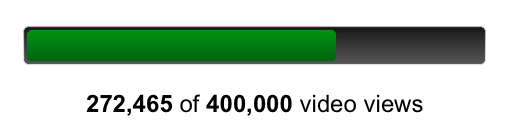
Additionally, a Campaign tab will show up on your channel, with a bar showing the progress toward your goal.
With more than 18,000 organizations in the YouTube Nonprofit Program we are always looking for ways to help nonprofits turn video views into greater awareness, petitions signed, laws changed, dollars raised, and lives saved. This year we released other tools you should check out like
live streaming
, a
playbook
with of best practices when using video, and other improved features like a
more prominent donate button
. We hope you enjoy our latest feature.
Posted by David D, Software Engineer, recently watched "
Follow the Frog
."
Google Earth Outreach launches in Australia and New Zealand
Tuesday, November 6, 2012
(Cross posted from the
Google Australia Blog
)
Great Barrier Reef coral health, fire management, and depleting forest cover are some of our nation’s greatest environmental challenges. But up until now it has
been a challenge to bring large-scale environmental issues (that might affect hundreds of thousands of acres) to life in a meaningful way. To help address this, we’re bringing
Google Earth Outreach
to Australia and New Zealand.
With Google Earth Outreach,
nonprofit organisations can use Google mapping tools to visualise their causes and tell their stories to millions of people around the world.
See
how nonprofits and researchers are using Google mapping tools.
Across the globe, nonprofits have used Google Earth Outreach to
help clear landmines
in Cambodia and Angola, and to
demonstrate forest and wildlife loss
in Sumatra, Indonesia.
At last night’s
official launch event
at Macquarie University, we announced new projects with three Australian partners.
Dr. Elizabeth Madin from
Macquarie University
demonstrated how her team is using Google Earth to further
her work
in investigating coral reef landscapes; they integrate ecological theory and
the high-resolution satellite imagery available in Google Earth to identify “grazing halos”, which may be able to tell us more about coral reef health.
The
Great Barrier Reef Marine Park Authority
launched an
interactive map
, which will shows how their
Reef HQ Aquarium
is bringing the Great Barrier Reef to students around the world. They also launched a
Google Earth narrated tour
following the track of Torres the Green Turtle as he swims along the Great Barrier Reef and meets incredible marine life along the way.
The
Australian Wildlife Conservancy
also unveiled two Google Earth tours. The
first tour
flies through their 23 sanctuaries which cover more than 3 million hectares to bring to life their fight to save Australia’s unique wildlife from extinction. The
second tour
overlays AWC geospatial data on top of Google Earth to demonstrate the impact of their EcoFire Project in the Kimberleys over the last six years.
Take the new Google Earth tour
from AWC
If you’re a nonprofit interested in learning more about the Google Earth Outreach program, check out
our website
. There you’ll find
tutorials
and a showcase of
nonprofit success stories
, and you can also
apply for grants
for Google Earth Pro, Google Maps Engine, Google Maps API for Business, and Google Maps Coordinate.
We hope that by bringing this program to Australia and New Zealand, many more organisations will be able to tell powerful visual stories about the important work they do, to both help them raise awareness and funds and further their scientific goals.
Posted by Raleigh Seamster, Program Manager for Google Earth Outreach
Take Your Social Strategy To The Next Level With Learn With Google Hangouts And Webinars
Thursday, November 1, 2012
Over the next few weeks, we’re offering four opportunities to learn more about Google+ for your business. We kick off with a Learn with Google Hangout on Air with bestselling author
+Chris Brogan
on November 5th at 10am PT / 1pm ET. Chris will cover tactics for successful social marketing and discuss his new book, “Google+ for Business: How Google's Social Network Changes Everything.”
RSVP for the Hangout on the
Google+ Event page.
Learn Chris’s recipes for how to grow and engage your Google+ community to build your brand and drive your business’s visibility and conversions. Hear about Chris’s own experiences helping companies succeed in their
content marketing and social projects.
Chris Brogan is a New York Times bestselling author, CEO of Human Business Works, and advises companies
on
marketing, b
usiness strategy
, communications and more.
If you have a question for Chris, leave your question as a comment on the
Google+ Event
.
Boost your success with Google+
Want to learn more about using Google+ for your business? Sign up for our
Learn with Google webinars
. Here are some great upcoming webinars to help you get the most out of social for your business:
Social that Adds Up: Performance and Measurement (Thurs, Nov 8, 10am PT / 1pm ET)
Supercharge your Social Media Initiatives with Video (Wed, Nov 14, 10am PT / 1pm ET)
Building a Digital Brand with Google+ (Thurs, Dec 6, 10am PT / 1pm ET)
Announcing The Winners Of 2012 Google Earth Outreach Developer Grants
Thursday, November 1, 2012
(Cross posted from Geo Developer Blog)
In 2011, Google Earth Outreach
launched
a new program to fund nonprofits that want to create cutting-edge maps for public good. Today, we’re excited to announce the winners of the
2012 Google Earth Outreach Developer Grants program
. We’ve selected eight nonprofit organizations, listed below, that have presented a compelling ideas for a new map or mapping technology that will make a positive impact on the world. Each winner received a grant to support the technical development of their map. The winners include:
The Royal Canadian Geographical Society
- A Developing World: a Maps API application containing UN Human Development Index data
Clinton Health Access Initiative
- Getting to Zero in Southern Africa: A Temporal and Spatial Map of Malaria Progress
SamSamWater Foundation
- Rainwater Harvesting Tool: Calculate Your Drinking Water using Google Maps
Wild South
- Cherokee Trails: Google Earth tours, a map, and an Android app documenting Cherokee Indian geography and the struggle of the Cherokee to remain in their homeland.
Internews
-Change of States Map: a Maps API application documenting local impacts and adaptations to climate change in the US.
Vanishing Worlds Foundation / World Oral Literature Project / Language Landscape - Language Landscape:
an Extensible Model for Mapping Language Dynamics
the Jane Goodall Institute
- Community-based Forest & Wildlife Monitoring: Scaling Up and Sharing Dynamically Generated Maps
Atlantic Public Media
- Monarch Migration: a Google Earth Tour
Work is already in progress on each of the projects, so check back on our
Developer Grants
page in the coming months to see these maps come to life, and to explore maps created by last year’s grantees.
Watch this video to see an example of a Google Earth Tour made possible by the 2011 Developer Grants program is the
Arctic Tern Migration
, created by the Atlantic Public Media. We’re very excited about the organizations that were funded this year, and we wish to thank these hardworking organizations who are improving conditions for people and the planet.
Posted by Tanya Birch, Google Earth Outreach
*These organizations were funded through the Google Inc. Charitable Giving Fund at the
Tides Foundation
.
Meet the Google for Nonprofits Team
Tuesday, October 23, 2012
Have you ever wondered who is behind the content you see on the Google for Nonprofits blog, our Google+ page or our monthly newsletter? In an effort to personalize our communications and give a face to Google for Nonprofits, we’ll meet a few members of our team in their own words.
1.
Andrea Xu
, Social Media Manager
“My name is Andrea Xu and I manage social media for Google for Nonprofits. I am privileged to communicate with this awesome community every day through [our]
Google+ page
. I love learning about the creative ways nonprofits are using Google tools to promote their cause. I am originally from Chicago area, and recently moved to the Bay Area. Since moving, I miss deep dish pizza, but have a newfound love for hiking!”
2.
Katie Kellogg
, Blog Manager
“I coordinate with our Google teams to post relevant information and write original content. Being at the intersection of technology and non-profits, our team gets to equip people and organizations with tools to help them change the world. I'm perpetually honored to be a part of Google for Nonprofits. A fun fact about me is I've been to all the Disney theme parks, except for one.”
3.
Tory Voight
, Newsletter Manager
“I interview various Nonprofits and Googlers, and research relevant Google updates for
our content
. It's split into four sections: 'By the way', 'What's new', 'Tools in action' and 'Ask an Expert'. I always learn something new with each month's work!
Growing up, I received support from Nonprofits - anything from food when my family couldn't afford it, or a mentor that helped me believe in myself. Those opportunities shaped me into the person I am now. As a G4NP
20%
er, this is my small way of giving back to such outstanding organizations.
Believing in work-life balance, I'm attempting to surf mornings in Pacifica and work on my oil paintings at night. In my former life, I dairy farmed and taught snowboarding in Vermont. I love being outdoors, so feel right at home in the Bay Area.“
4.
Leslie Hernandez Dinneen
, Product Marketing Manager
“I have always loved nonprofit organizations - started volunteering when I was seven. I love Google for Nonprofits because our program is all about helping nonprofits use Google's technology tools to further their mission.
Before I was a Googler, I spent a year in Argentina interviewing ~12 Argentine human rights organizations for a research fellowship."
Want to stay connected with our team and Google for Nonprofit’s content? Make sure to keep reading out blog, follow us on
Google+
and sign-up for
our newsletter
.
Posted by Katie Kellogg, Google for Nonprofits team
Grow Your Gifts Recap: Seven Steps To Success
Wednesday, October 17, 2012
Are you ready for the end-of-year philanthropic season? Over the last few weeks, we’ve explored some of our favorite tips and best practices through the
Grow Your Gifts
series to help you make the most of this giving season. If you missed any of our posts, check out our seven steps to success, recapping the entire series:
Understand online giving trends:
Online giving is growing and online donors give more than offline donors, according to a
Blackbaud report.
Get the full story from two of our favorite giving reports from
Blackbaud
and
M+R Research Labs and NTEN
.
Know your seasonality:
Almost
35% of 2011 online giving happened
in October through December, according to a
Blackbaud giving report.
Are you seeing the same trends? You can see exactly what your seasonality looks like with
new Google Trends
(formerly
Google Insights for Search)
.
Optimize your AdWords campaigns:
To get your Google AdWords and Google Grants campaigns ready to reach people searching on Google.com, make sure you add new keywords, social extensions and sitelinks.
Make donation emails more effective:
Email donations made up 35% of online giving in 2011, according to the
eNonprofit Benchmarks Study
. To create the strongest impact, add videos and images that can tell your story visually and hyperlinks to social media to showcase your community.
Use donor information wisely:
Turning one-time donors into active and on-giving givers can often be a challenge, so understanding personal giving trends is important in helping communicate with and persuade those donors. Google Spreadsheets and
filters
can help you organize and sort data, and
sharing
Google
Calendars
can help your team coordinate on different mailings and communications.
Save time with the Google for Nonprofits t
emplate
bundle:
Google Docs is a great way to organize information and create communications. So, to get you started, we’ve provided templates for
donor thank-you cards
,
donor mailing labels,
event invitations
,
RSVPS
and
newsletters
.
Accept donations with Google Wallet:
Allow donors to make online gifts quickly and easily with Google Wallet. Just make sure you sign up for a
Google merchant account
, identify yourself as an IRS
certified
501(c)3 and begin collecting donations.
We’re excited to see how you this information helps you make the biggest impact over the next few months. If you have any tips to share, let us and the Google for Nonprofit community know on
our Google+ page
.
Posted by Katie Kellogg, Google for Nonprofits team
Google Maps Coordinate Grants for Nonprofits
Thursday, October 11, 2012
Google Earth Outreach
is happy to announce the latest offering in our Grants program: Google Maps Coordinate.
Google Maps Coordinate
is a workforce management tool that allows organizations to quickly and easily assign jobs to field workers, improving operational efficiency and communication. Coordinate lets a dispatcher team have real-time visibility into the locations of the field workers, and they can send job assignments directly to their mobile devices. In the field, mobile workers can accept jobs, add relevant information to each job assignment, keep their dispatchers updated, and work more efficiently knowing where all the other field workers are.
We’re looking forward to helping nonprofits use Google Maps Coordinate to do things like deploy urban forestry teams, urban car-sharing services, or mobile health workers to conduct surveys in villages.
The Android Google Maps Coordinate app enables complete offline job access, so you can accept, check-in, and complete jobs include any notes on the job offline. Your updates will sync as soon as you’re back online.
Learn more
about how Google Maps Coordinate works. Eligible nonprofits in the U.S., U.K. and Canada are welcome to
apply for a Google Maps Coordinate grant
today.
Posted by Tanya Birch, Google Earth Outreach
Labels
AdWords Basics
98
AdWords in the Curriculum
9
Google Analytics
9
Google Apps
25
Google Apps Highlights
10
Google Earth
18
Google Earth Outreach
28
Google for Nonprofits Blog
529
Google Fusion Tables
2
Google Maps
10
Google Products
63
Google Sketchup
2
Google+
16
Grantees
98
Grants Program
97
Optimization
59
Program Alerts
15
Resources for Non-Profits
179
Tracking Performance
35
YouTube
26
Archive
2016
Sep
Aug
Jul
Jun
Apr
Mar
Jan
2015
Nov
Sep
Aug
Jul
Jun
May
Apr
Feb
2014
Nov
Oct
Aug
Jul
Jun
Apr
Feb
2013
Dec
Nov
Oct
Sep
Aug
Jul
Jun
May
Apr
Mar
Feb
Jan
2012
Dec
Nov
Oct
Sep
Aug
Jul
Jun
May
Apr
Mar
Feb
Jan
2011
Dec
Nov
Oct
Sep
Aug
Jul
Jun
May
Apr
Mar
Feb
Jan
2010
Dec
Nov
Oct
Sep
Aug
Jul
Jun
May
Apr
Mar
Feb
Jan
2009
Dec
Nov
Oct
Sep
Aug
Jul
Jun
May
Apr
Mar
Feb
Jan
2008
Dec
Nov
Oct
Sep
Aug
Jul
Jun
May
Apr
Mar
Feb
Feed
Google
on
Follow @googlenonprofit
Follow






 Follow